

WhatsApp scheduling vs appointment software: what works
Compare WhatsApp and appointment software to organize bookings, team availability, schedule changes, and customer follow-up.
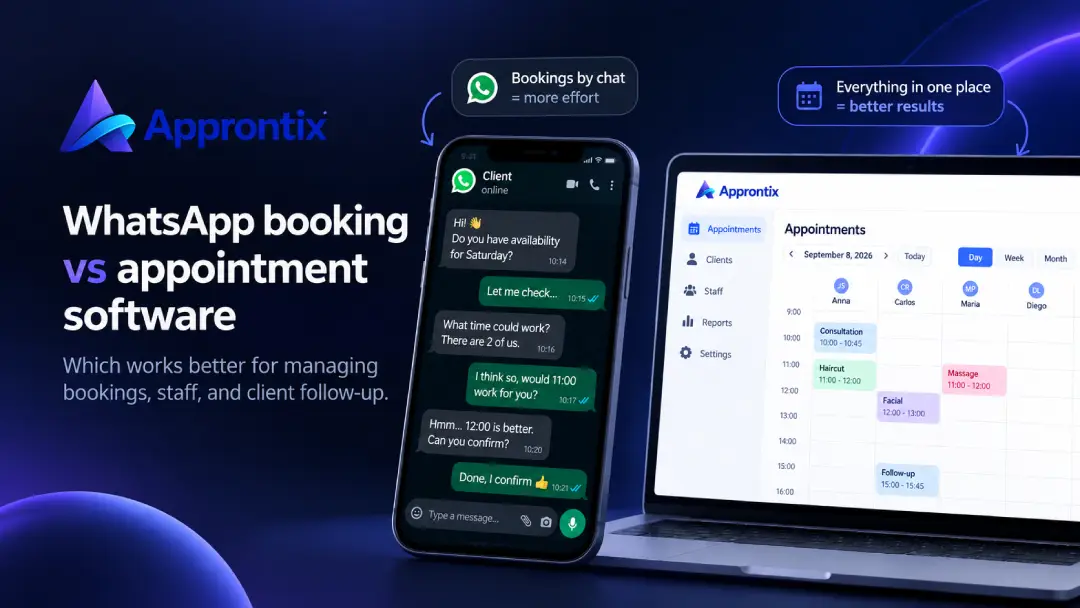
WhatsApp is great for talking with customers and is often where appointment requests first arrive. The problem starts when the chat becomes the schedule: time changes get buried in messages, two people answer at once, information lives on one phone, and nobody can clearly see what happened that day.
You do not have to choose between personal service and organization. WhatsApp can remain a communication channel while appointment software becomes the reliable source for your schedule.
When WhatsApp is enough
If you have a small number of appointments, work alone, and all bookings go through one conversation, a manual approach may work temporarily. It is fast for questions and personal follow-up.
Even then, a chat does not automatically show every available time, prevent schedule conflicts, or build an operational history you can review later.
What changes when chat becomes the schedule
The limits usually show up gradually: important messages mix with questions and photos, availability by staff member or service is hard to see, team members may offer the same slot, and rescheduling requires searching several conversations.
The cost is often not one dramatic mistake. It is repeated minutes every day, slower replies, and decisions made with incomplete information.
What appointment software adds
Appointment software organizes the work around the booking: calendar, customer, service, assignee, and status. That makes it possible to see the full day, move a booking without losing its context, and check availability before answering.
The Approntix appointment schedule includes day, week, and month views, staff assignment, and booking changes. Public booking links can collect requests without coordinating every time slot in chat, while WhatsApp notifications keep communication close to the customer.
A practical comparison
| Need | WhatsApp only | Appointment software |
|---|---|---|
| Answer a quick customer question | Very useful | Can support the conversation |
| See every open time slot | Requires notes or message review | Centralized calendar |
| Coordinate a team | Depends on who reads the chat | Shared visibility and assignment |
| Reschedule a booking | Manual search | Change recorded in the schedule |
| Check customer history | Scattered conversations | Operational customer record |
| Review business activity | External calculations | Reporting based on plan and operation |
Transition without losing the personal touch
You do not need to turn off WhatsApp overnight. Start with one internal rule: every confirmed booking must be in the central schedule. Then share a booking link for services and times customers can manage on their own. Keep chat for guidance, special cases, and genuine customer care—not as the only database for the business.
Train the team on one flow: receive the request, check availability, create the booking or send the link, confirm it, and reschedule from the same place. A new tool cannot solve the problem if everyone follows a different process.
Frequently asked questions
Can I keep using WhatsApp with appointment software?
Yes. WhatsApp can remain the place for questions and notifications. The difference is that the confirmed booking information lives in a shared schedule.
Is appointment software useful when I work alone?
Yes. It can prevent schedule conflicts, preserve customer history, and keep you from searching through conversations for appointment details.
What information should an appointment include?
At a minimum: customer, service, date, time, assignee, and status. Depending on the business, it can also include duration, location, notes, and payment status.