
Scheduling and operations
For spasOne workspace Built to scale EN + ES
Appointment software for spas with specialist scheduling and client experience
Approntix helps spas coordinate treatment bookings, specialist availability, client history, and multi-service workflows with more control.
From solo teams to multi-location
International-ready experience
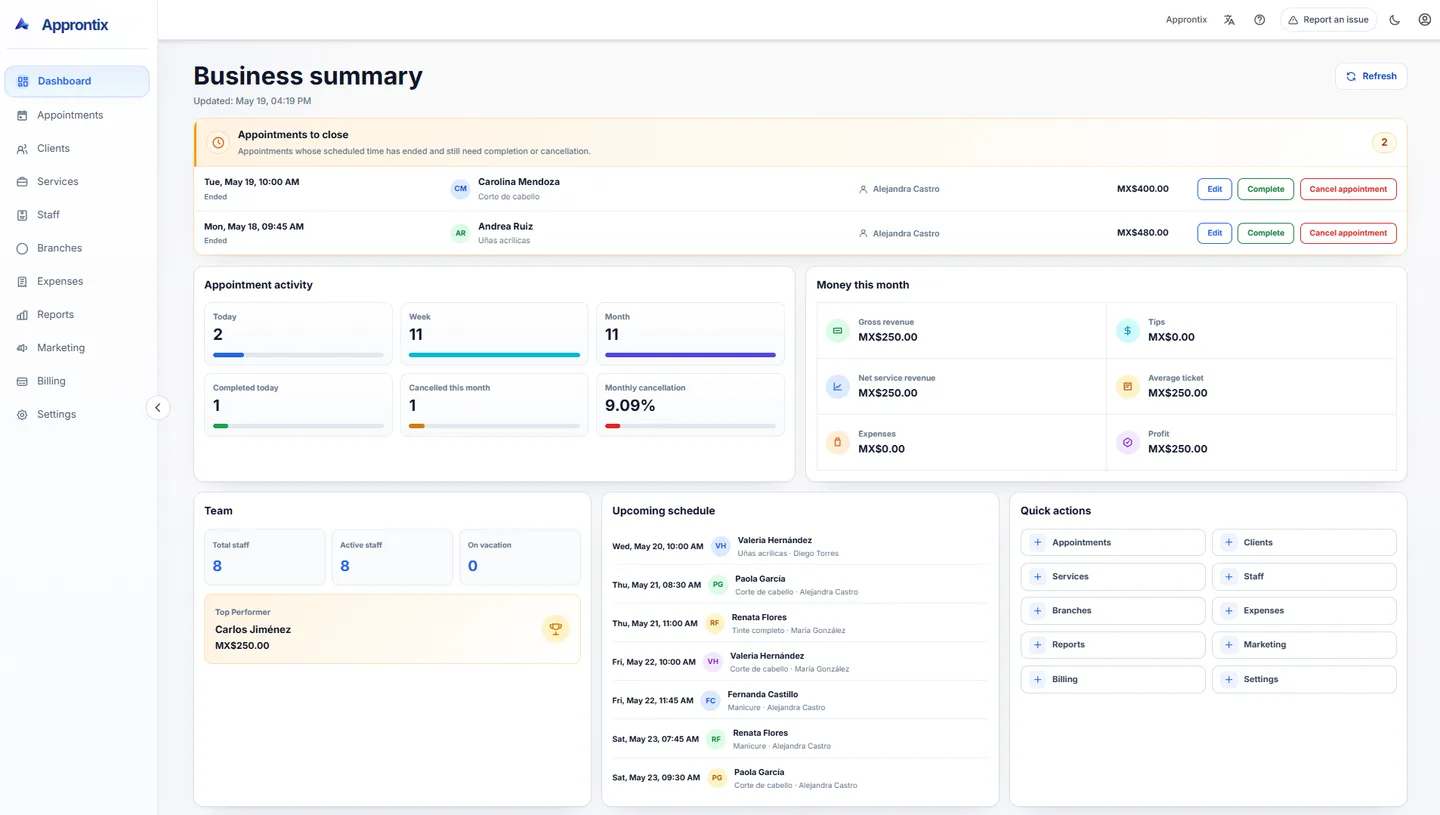
Live Approntix dashboard with appointments, performance indicators, client activity, and operational visibility.
Spa workflows
Built for environments where treatment time, specialist assignment, and client retention drive every booking.
Spas need more than a calendar — they need visibility into treatment load, specialist availability, and client history continuity.
Coordinate services with different durations, specialists, and preparation needs.
Give the team visibility into how treatment load, service timing, and specialist assignments interact throughout the day.
Keep client preferences and history close to every booking.
Use visit notes and service records to make each return visit more consistent and more personalized.
Stay on top of daily capacity without losing the pace of the business.
Track specialist availability, room use, and service flow from one dashboard so decisions are faster and clearer.
Core product
What service businesses need to manage scheduling, clients, and daily operations.
Approntix covers the daily workflows behind bookings, service delivery, team coordination, and business visibility.
Scheduling built for busy service teams
Manage day, week, and month views with the context needed to move bookings fast and keep availability clear.
Clients with history and operational context
Keep visit history, notes, spend, and service activity visible so follow-up does not depend on memory.
Services, staff, and capacity in sync
Coordinate who can deliver each service, how availability works, and where team capacity is going.
Reporting for daily control
Review appointments, revenue, expenses, team performance, and operating trends from one dashboard.
Branch-ready operations
Move from one location to several without losing visibility over schedules, teams, and service flow.
Easy to keep on the phones your team already uses
Teams can save Approntix to the mobile home screen and open it in one tap, without relying on an app-store install.
Explore product pages
Explore pages built around industries, modules, and buying questions.
These pages go deeper into how Approntix fits different service businesses, operational needs, and buying moments.
Features
Explore the full feature set
Review the current modules, what each one solves, and how Approntix supports the daily operation behind appointments.
Explore featuresBarbershopsAppointment software for barbershops
See how Approntix helps chair-based teams manage bookings, repeat clients, and barber schedules.
Explore barbershopsBeauty salonsAppointment software for beauty salons
A closer look at longer services, specialist assignment, and client-heavy beauty workflows.
Explore beauty salonsSpasAppointment software for spas
Coordinate treatment bookings, specialist scheduling, and client history for spa operations.
Explore spasMedical clinicsMedical appointment scheduling software
Manage patient bookings, provider availability, and clinic operations from one platform.
Explore medical clinicsPhysical therapyPhysical therapy scheduling software
Coordinate therapy sessions, patient progress, and therapist availability for rehabilitation clinics.
Explore physical therapyPricingCompare plans and rollout options
Review current plans, public booking options, and when it makes sense to move into a branded online booking experience.
View pricingBoost your operations
Intelligent architecture for teams that run on appointments.
Approntix centralizes daily operations in an interface built for visibility, control and real team coordination.
10
System areas
See and manage the key business areas from one operational source of truth.

Connected systemA central view to coordinate services, scheduling and operations in real time.
The platform connects catalog, bookings, clients and settings so every area works with the same context.
3
Ways to view your schedule
Adapt the calendar view to organize changes, availability and workload with more clarity.
4
Control layers
Oversight through roles, permissions, staff and branches to keep operations structured.
Roles and permissions
Custom access based on how each team works.
Set specific access by profile so each team member only sees what they need to operate.
Reporting and control
Clear visibility into revenue, expenses and performance.
Dashboards and reports that turn day-to-day activity into clearer business decisions.
Clients and follow-up
History, tags and commercial context in one place.
Keep a useful view of each client for follow-up, retention and better service.
Connected operations
Services, public site, and online bookings aligned in the same workflow.
Coordinate who serves, where they operate, and how public booking links, the public site, and online reservations stay connected from one system.
Pricing
Choose a plan based on how your team books today and how you want to grow next.
Start with scheduling essentials, then grow into reporting, public booking links, permissions, and a custom booking landing as the business expands.
Free
For a solo operation that needs to organize scheduling, clients and services from the start.
Best forIndependent professionals or early-stage teams.
Free
Includes
- Dashboard and indicators
- Scheduling and appointments
- Clients and operational history
- Services and categories
- Staff and service assignment
- Branches by plan
Plan limits
- Branches1
- Users1
- Staff5
- Clients200
- Appointments / month150
- Services20
- Service categories5
Basic
For small businesses that already share operations and need stronger visibility and reporting.
Best forSmall teams with one or multiple chairs, rooms or service stations.
MX$299
/monthYearly billing: MX$2,555
Includes
- Dashboard and indicators
- Scheduling and appointments
- Clients and operational history
- Services and categories
- Staff and service assignment
- Branches by plan
- Latest 10 history entries per client
- Calendar export (.ics)
- Client financial metrics
- Operational and financial reporting
- Public booking links
Plan limits
- Branches3
- Users5
- Staff10
- Clients400
- Appointments / month400
- Services50
- Service categories10
Recommended
Pro
For growing businesses that need staff control, expenses, marketing and permissions.
Best forGrowing operations with more bookings and stronger commercial follow-up.
MX$699
/monthYearly billing: MX$6,500
Includes
- Dashboard and indicators
- Scheduling and appointments
- Clients and operational history
- Services and categories
- Staff and service assignment
- Branches by plan
- Operational and financial reporting
- Full customer history
- Custom cancellation reasons
- Staff commissions
- Expense tracking
- Marketing campaigns
- Custom roles and permissions
- Custom landing page with booking
- SEO, metadata, and public-site configuration
- Visual, content, and media customization
Plan limits
- Branches5
- Users15
- Staff20
- ClientsUnlimited
- Appointments / monthUnlimited
- ServicesUnlimited
- Service categoriesUnlimited
Free is available today. Basic adds public booking links. Pro adds a custom public landing with booking and visual customization.
FAQ
Questions teams ask before changing appointment software.
These answers focus on setup, multi-location workflows, reporting, team management, and overall fit.
Approntix is built for service businesses that depend on appointments, staff coordination, and daily operational visibility.
Talk to the team
Talk to the team and choose the right plan.
Share how many branches, staff members and appointments you manage so we can recommend the best plan and rollout path.